Table View: Manage Your Whole Set Like a Spreadsheet
Managing a set used to mean opening cards one at a time. Table view changes that. It lays an entire set out as a spreadsheet, one row per card, so you can see and edit everything at once: what you own, what you still need, what each card is worth right now, and how your money is doing. It is the most powerful way to manage a collection on PokeTrack, built for collectors who want to *work* their sets, not just browse them.
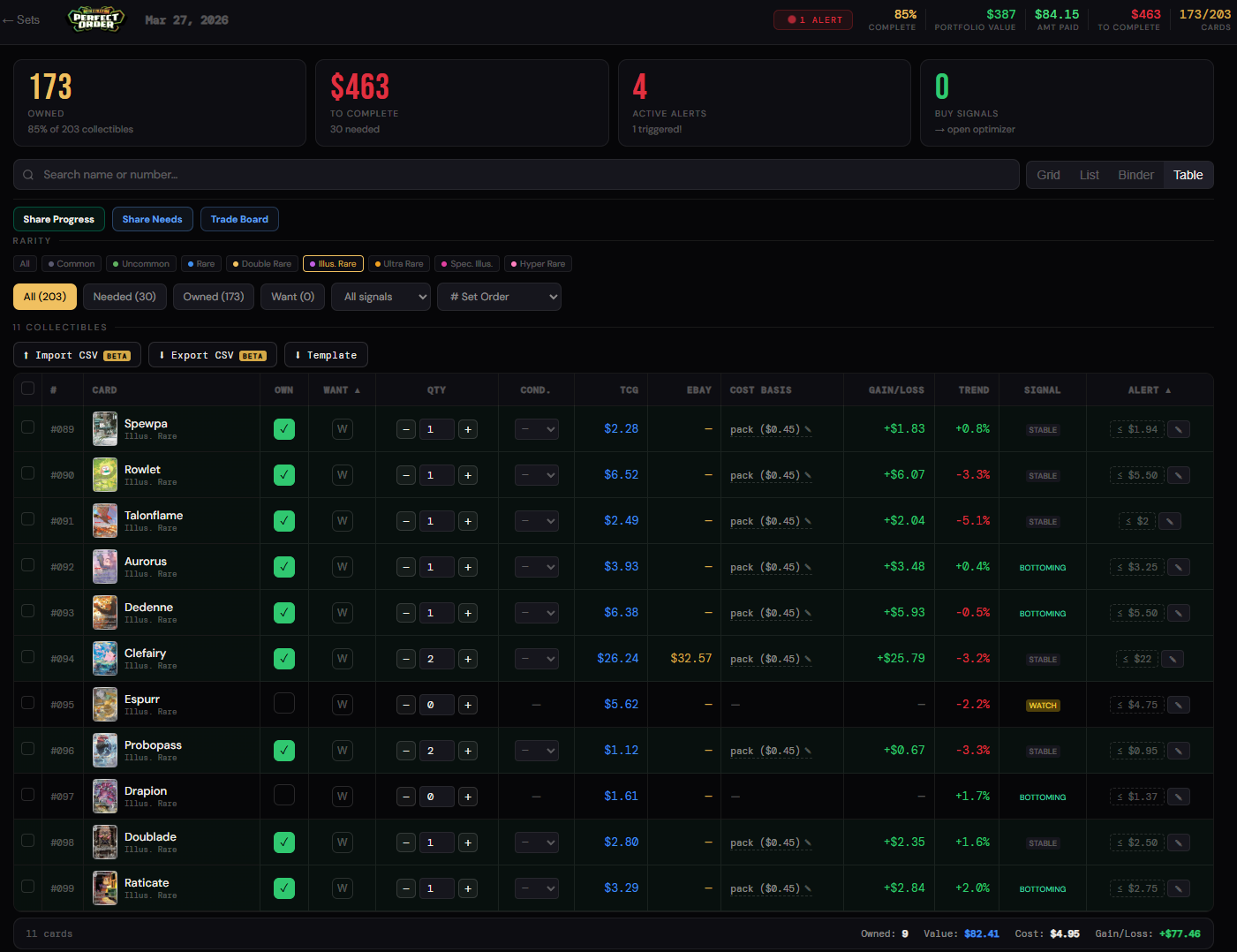
One row per card, fully editable inline
Toggle owned or want, step quantities up and down, and set condition right in the row, with no need to open a detail page. Every change saves instantly and syncs to your Grid, Binder, Pokedex, and public profile.
Live prices, side by side
Each row shows the current TCG market price next to the eBay sold price where available, so you can weigh reference pricing against what cards are actually selling for.
Cost basis and real-time gain or loss
Table view tracks what you paid, including pack-pull cost, against current value and shows your gain or loss on every card in real time. The footer totals it all up: owned count, total value, total cost, and overall gain or loss for the cards in view.
Trends and buy signals
A 24-hour price trend sits on every card, alongside a signal (stable, bottoming, or watch) that flags cards which may be near a buying opportunity. Filter by signal to jump straight to the movers.
Filter and sort the way you think
Narrow a 200-card set in a couple of taps: filter by rarity, by status (needed, owned, or want), or by buy signal, and sort by set order. Find exactly the cards you care about without scrolling past the ones you do not.
Price alerts in the grid
Set and see per-card price alerts right in the table, so PokeTrack can notify you when a card drops to the number you are waiting for.
Bulk import with CSV (beta)
Add your whole collection at once with the CSV import wizard instead of card by card. Download the template to match the format, fill it in, and import. This one is in beta, so tell us how it goes.
Completed sets shine
Finish a master set and it earns a gold outline with a soft shimmer on the Sets grid, a glow that builds as you climb from 85 percent toward a complete 100 percent.
Why Table is the new primary view
List view showed you your cards. Table view lets you *manage* them. Everything List did, Table does too, and it adds inline editing, live pricing, cost basis, gains, trends, signals, alerts, and bulk import in the same place. Table is now the primary way to work through a set, and we will be gently phasing the older List view out over the coming weeks. A simple mobile-friendly view stays available while we make sure Table feels great on a phone.
Open any set and choose **Table** from the view switcher (Grid, List, Binder, Table).
Yes. Table writes to the same collection as every other view, so toggling ownership or quantity in Table is reflected instantly in Grid, Binder, your Pokedex, and your public profile.
In Table view, open the CSV import wizard (beta) and download the template. Fill in your cards, upload the file, and PokeTrack matches them to the set. The template shows the exact columns to use.
Table is now the primary view. We will phase List out gradually over the coming weeks and keep a simple view available on mobile in the meantime, so nothing disappears from under you.